Stop optimizing for AI in the dark. Microsoft just “turned on the lights” AI Visibility dashboard!
Author:
Kevin C. Roy
· GreenBanana SEO · Published:
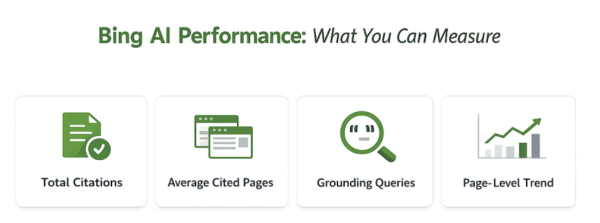
Microsoft has introduced an “AI Performance” dashboard inside Bing Webmaster Tools, finally allowing SEO teams to track when and where their content is cited by Microsoft Copilot and Bing AI summaries. By monitoring Total Citations, Average Cited Pages, and Grounding Queries, you can turn top-cited pages into seed assets, identify authority drift, and actively and systematically increase your AI search visibility.
Search is changing fast — people aren’t clicking ten blue links first anymore. Links are becoming an “add-on” to an AI answer.
That means the goal isn’t just rank. The goal is to become the source the AI cites. The problem is: until now, most teams were trying to improve AI visibility without a real dashboard showing what’s happening.
Here’s what just changed in AI search that you should know about: Microsoft introduced “AI Performance” inside Bing Webmaster Tools — a view into when your site is cited in AI answers, including Microsoft Copilot and AI summaries in Bing.
The video below is the walkthrough. This page is the companion: highlights, takeaways, tables, checklist, and a structured FAQ you can use immediately.
Bing Webmaster Tools just added “AI Performance,” a dashboard designed to show when your site is cited in AI answers across Microsoft Copilot and AI summaries in Bing. The most useful parts are citation volume, how many different pages get cited, the “grounding queries” used to retrieve sources, and page-level citation trends. Use this data to identify your top cited pages as seed assets, correct “authority drift” using grounding queries, and repeat what caused citation spikes — on purpose.
Highlights: What Stood Out (and Why It Matters)
This isn’t just another metric page. It’s a directional signal: Microsoft is giving you feedback loops for citations. If you’ve been doing AEO “in the dark,” this is closer to turning the lights on than anything we’ve had from a platform dashboard.
Here are the 5 highlights from the update:
- AI Performance is now inside Bing Webmaster Tools: a dedicated view into when your site is cited in AI answers, including Copilot and AI summaries in Bing.
- Total Citations shows how often you appear as a source: not clicks — citations.
- Average Cited Pages shows breadth: how many different URLs are getting pulled in per day.
- Grounding Queries show the retrieval phrases: what the system searched for when it went looking for sources.
- Page-level activity + trend line shows what’s working: which URLs carry the load and whether citations are trending up or down.
The big implication: you can stop guessing which pages are “AI-visible” and start using real citation signals to decide what to expand, what to clarify, and what to build next.
Takeaways: What to Do (Fast)
You don’t need a complicated system to use this. You need a simple loop that turns citation data into page improvements. Here’s the practical version of the playbook from the video.
- Turn your top cited pages into “seed assets”: don’t replace them — expand them with adjacent questions, tighter headings, and a table/checklist that makes the page easier to cite.
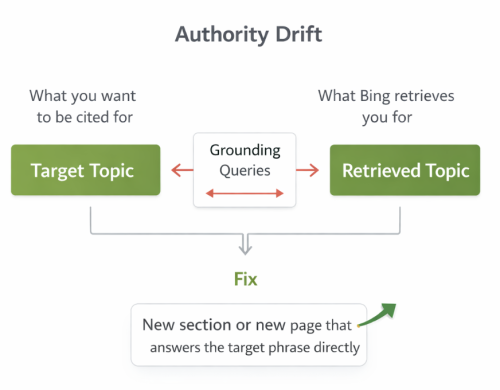
- Use grounding queries to spot authority drift: if you want to be cited for one topic but Bing retrieves you for another, that’s a signal to build a section or a new page that answers the target phrase directly.
- Watch the trend line like a stock chart: when citations jump, ask what changed, such as a refresh, internal links, or a proof section, then repeat what worked across similar pages.
- Don’t ignore technical hygiene: citations don’t automatically mean clicks, and Bing still respects robots.txt and controls — so crawl and index hygiene still matters.
The goal is simple: keep what’s being cited, strengthen what’s close, and build what’s missing — using the dashboard as a compass.
Turn the Highlights Into a Blueprint
Use the table below as your implementation cheat sheet: what each metric tells you, why it matters, and what action to take next.
| Highlight | What It Signals | Why It Matters | What To Do Now |
|---|---|---|---|
| AI Performance dashboard exists | Microsoft is exposing citation visibility signals. | You can measure AI visibility instead of guessing. | Check it weekly and treat it like an analytics source, not a novelty. |
| Total Citations | How often you appear as a source in AI answers. | It’s the closest thing to a citation KPI. | Track baseline, then measure impact after page improvements. |
| Average Cited Pages | Breadth of pages being pulled as sources. | One page carrying citations is fragile. | Build supporting pages so citations spread across multiple URLs. |
| Grounding Queries | The phrases used when AI looked for sources. | Shows what you’re “known for” in retrieval. | Fix authority drift by answering target phrases directly with a new section or new page. |
| Page-level activity + trend line | Which URLs are doing the work and whether you’re trending. | Gives you a repeatable optimization loop. | When citations spike, identify what changed and replicate it systematically. |
Ranking Mindset vs AI Visibility Mindset
| Ranking Mindset | AI Visibility Mindset |
|---|---|
| Track positions | Track citations and cited pages |
| Optimize for clicks | Optimize to be used as the source |
| Keyword-only targeting | Entity clarity + answer structure + proof |
| One “hero page” | Seed assets + supporting pages |
| Monthly reporting | Weekly feedback loops from AI Performance |
AI Citation Visibility Checklist (Bing AI Performance)
- ☐ I verified Bing Webmaster Tools access and can see AI Performance.
- ☐ I recorded a baseline for Total Citations with a weekly snapshot.
- ☐ I identified my Top 3 cited pages and treated them as seed assets.
- ☐ I expanded seed assets with adjacent questions and tighter headings.
- ☐ I added at least one table and one checklist to improve extractability.
- ☐ I reviewed Grounding Queries to spot authority drift.
- ☐ I created a section or new page that answers the target phrase directly.
- ☐ I monitored the page-level trend line after changes.
- ☐ I noted what changed during citation spikes and documented the pattern.
- ☐ I confirmed technical hygiene, including robots.txt, crawl controls, and indexability.
Watch the Video (Full Walkthrough)
This post is the companion. The video is the walkthrough: https://youtu.be/OZHUI6PX2AI?si=9sxc8nk5CFQE6ZTJ
These videos are frameworks you can copy — so you leave with a plan, not just ideas.
FAQ
- What is “AI Performance” in Bing Webmaster Tools?
- AI Performance is a dashboard in Bing Webmaster Tools that reports when your site is cited as a source in AI answers across Microsoft Copilot and AI summaries in Bing. It’s designed to show citation visibility, not just rankings. Use it to identify which pages and queries are driving AI citations.
- What does “Total Citations” measure?
- Total Citations is the count of how many times your site appeared as a cited source in AI answers. It does not automatically mean clicks. Treat it as a visibility signal and track it over time as you improve pages.
- What does “Average Cited Pages” tell you?
- Average Cited Pages shows how many different URLs get cited per day. More cited pages usually means your authority is distributed across multiple assets. If only one page is cited, your visibility is fragile.
- What are “Grounding Queries” and why do they matter?
- Grounding Queries are the phrases the AI used when it went looking for sources. They show how the system is retrieving your content. Use them to understand what your site is being “anchored” to in AI retrieval.
- What is “authority drift” in AI search?
- Authority drift is when you want to be cited for one topic, but the system consistently retrieves you for a different topic. That’s not always failure — it can be a signal that your authority is real but anchored in the wrong neighborhood. Fix it by answering the target phrase directly with a new section or page.
- How should I use the “Top cited pages” report?
- Start with your top cited pages and treat them as seed assets. Don’t replace them — expand them with adjacent questions, tighter headings, and extractable elements like a table and checklist. Then build supporting pages that link to and reinforce those seeds.
- Why watch the citation trend line “like a stock chart”?
- The trend line helps you detect cause and effect. When citations jump, ask what changed: a refresh, better internal links, a new proof section, or clearer structure. Then repeat what worked across similar pages to compound results.
- Do AI citations automatically increase website traffic?
- No. Citations don’t automatically mean clicks. But citations can increase trust, brand recognition, and future retrieval — especially when your site becomes a consistent source.
- What technical issues can block AI citation visibility?
- Bing still respects robots.txt and other crawl controls, so technical hygiene matters. If key pages aren’t crawlable or indexable, they can’t be cited reliably. Treat crawl accessibility as a prerequisite for AI visibility.
- What’s the fastest first step after reading this?
- Open AI Performance, find your Top 3 cited pages, and expand each with adjacent questions plus a table/checklist. Then review Grounding Queries to confirm you’re being retrieved for the topics you actually want. Track the trend line weekly and document what causes spikes.
Ready to talk through your AI search strategy?
Contact GreenBanana SEO to discuss how your content can be structured for search engines and AI-driven discovery.